Showing posts with label online learning. Show all posts

Wednesday, 8 January 2020

Eduflow for building online, blended and flipped courses

If you are looking for a fast and simple way to build online courses or digitise your existing courses then Eduflow could be the tool for you.

What I really like about Eduflow is that it takes a lot of the work out of the course construction process by having ready-made blocks or 'flows' that you can just select and add your content to.

Using Eduflow to create an online course

To create a course on Eduflow, just register and then click on 'Create or Join'. This will enable you to give your course a name and create it.

Once the course is created it simple to add activities to it, just click on 'Add activities & flows'.


You can then add content to your course. Content could be a mixture of text, images, links videos or you could upload a file for students.

Once you have created your content you can set up rules to define when and for how long students can access the content. This is really useful if you want to blend the course with work you're doing in the classroom and ensure that the online work is done at a specific time. It should also help to reduce student procrastination, which is one of the big negative impacts of online learning.
Once the content is created you can use flows to define how your students will respond to it and who and how their response will be evaluated.

There are two kinds of ready-made 'flows'. These are peer-reviewed assignment flows or instructor reviewed assignment flows.
The flows are in three parts: The student submits their work, the work is reviewed either by a peer or the instructor and then the students submit a reflection on their feedback. This three-part flow really encourages deeper learning and puts far more emphasis on the quality of feedback and understanding rather than just whether students have got things right or wrong. Again this approach helps to combat one of the most common weaknesses of online courses that rely on computer configured responses to students' input.

If you aren't happy with these flows or you want to customise them you can create your own or add additional stages.

Once you've created your course content and assignments you can easily add students to the course by giving them a simple link or you can invite them by email.

Tracking student progress is also simple and you can also set up notifications so that you know when student work has been submitted.

So that's how to create a course with Eduflow

  • Eduflow looks like a great tool to create blended or flipped courses on the fly as you teach the face-to-face element of the course.
  • You could set up a totally online course and invite your students via email or a link.
  • Eduflow's focus on feedback and reflection also makes it an ideal e-portfolio tool to collect student work over the semester.

What does it cost?

You can use Eduflow for free to create two courses for up to 50 students. After that, you do have to pay, but prices are very reasonable so whether you want to use it for a whole school solution or to get started delivering online courses independently, then Eduflow is a great, fast and easy to learn solution to get you up and running quickly.

You can find links to many more resources like this and activities for the digital classroom in my ebooks at: https://payhip.com/peacheypublications
To sign up for my free newsletter and get a free copy of Digital Tools for Teachers go to: http://eepurl.com/dtgL79

Check Out My Books:


Best
Nik Peachey


Wednesday, 15 November 2017

Making your Classroom Paperless and Media Rich with Unio

Unio is a great tool if you want to ditch your course book and make your lessons paperless and media rich.

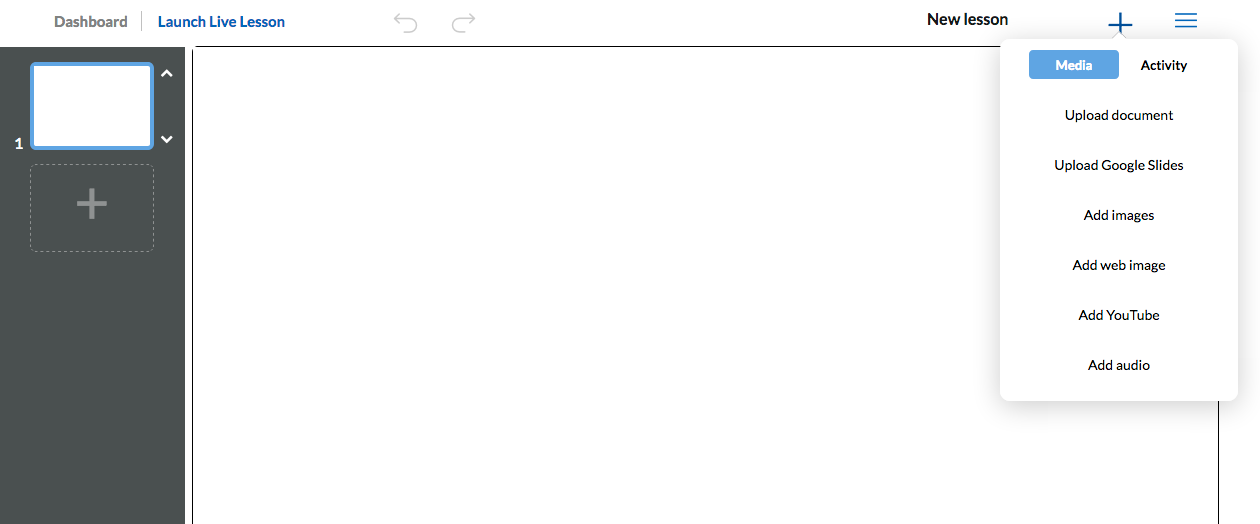
It’s a very easy tool to use. You can set up courses just by clicking on the cross in the top right of screen.
Once you have created your course topic, adding and editing lessons is simple.
Once the editor is open you can upload ready made presentations in multiple formats and add interactivity to them or create the lesson by adding individual elements and interactive learning objects.

Once the lesson is created Unio is really simple to use. You just launch the live session and any student can then log in to the lesson with just their name and the class code.

Unio works in the web browser so will run on any device regardless of the operating system, so it’s ideal for the BYOD classroom.

Once students have the lesson open on their device they can use the tools to annotate it, answer polls, watch videos or if they have questions they can send them in to the teacher.

As the teacher you can control which slide they are seeing or you can ‘unsync’ the presentation and allow them to browse. When the presentation is ‘unsynced’ students can watch any video or media clips independently on their own devices rather than collectively on your main presentation screen. This is great if you want students to watch or listen at their own pace.
When you finish a live lesson you can leave it open for students to browse and work through independently, so there is potential to use this for a flipped learning approach too, or you can use it for 100% online classes instead of screen sharing (and save a lot of bandwidth).

Unio is a freemium product, but the free version is very usable and the if you want to upgrade and use this at a school level then it’s still very reasonably priced.

Unio is still in its early days and the company is very keen to work with schools and educators to develop the product. You can find out more about that here: https://uniobyharness.com/about

Unio has huge potential for the digital classroom and is a great way to keep devices, fingers and minds occupied and working in a constructive way.

I hope you enjoy using Unio and your students find it rewarding. You can find 100 + more tools and resources like this in my ebook Digital Tools for Teachers - Second Edition or if you want to train other teachers to use these kinds of tools check out the Trainers’ Edition.


My Books:
 Best

Nik Peachey

Monday, 28 July 2014

Why do students frequently drop out of online courses?

Over the past couple of years 'MOOCs' (massive open online courses) have become the latest trend in the attempt to harness the power of online learning. MOOCs though, just like other forms of online learning have suffered from very high drop out rates.

So what's the cause the high drop out rates among online learners and what can we actually do about it?

In the questionnaire below I've added some possible causes of drop out. Please could you add any others that you can think of and use the 'Pros' in the argument section to make any simple suggestions for how to combat the problem.


Thank you for sharing your suggestions and helping with this simple research questionnaire.

Related links

Best

Nik Peachey

Tuesday, 18 June 2013

What do you feel are the key digital literacy skills that 21st century learners need?

Digital literacy has become one of the major issues facing educators in this early part of the 21st century. The need to develop students and teachers digital literacies has become increasingly accepted as fact and yet most teachers' and students' understanding of what exactly constitutes a digital literacy still seems to remain quite vague. Even more vague seems to be teachers' understanding of how precisely we go about developing those literacies.

For some it is simply a matter of 'using' the hardware and by teaching a lesson that involves the use some form of new technology some teachers feel they are fulfilling their responsibility for developing their students' digital skills, but for some teachers developing digital literacies involves far more than coming to terms with the newest hardware gadget.

So to try to identify what precisely those digital literacy skills are that we should be helping to develop I've launched this crowd-sourcing questionnaire to collect and share opinions from teachers around the world.

Please read it and by all means contribute ideas and arguments for or against the various digital literacies outlined.

NB: Registration isn't necessary to contribute an idea or opinion (Click the X when asked to register if you would prefer not to.)


powered by tricider

Also feel free to leave questions in the comments below.

I hope you find this useful.

Related links:


Best

Nik Peachey