Showing posts with label eap. Show all posts

Friday, 1 September 2017

A Tool to Encourage Students to Self-Correct & Improve their Writing

SAS Writing Reviser is a really cleverly designed Chrome Add-on to get your students self-assessing and improving their own writing. Once installed, you can open a document in Google Docs and then decide what aspects of your writing you would like to improve.

The add-on opens in the sidebar of the document, and you can select from a number of aspects that you would like to work on.
 Select from the menu, and you will see a sub menu that has more specific features to choose from.
 When you click on one of the features, you will see the places in your document where improvements could be made and get a list of them in the sidebar.
 You can then decide which sentences are okay and which you would like to improve.
You can also get some advice and explanation of the feature to find out how it impacts on your writing.
 This is a marvellous tool which I intend to start using myself. It doesn't do the work for the students like a grammar or spell-checker, but it does push them to think about their writing at a more stylistic level.
 It's probably more suited to higher level learners and particularly good for anyone working on EAP or studying for an IELTS or similar exam.

SAS Writing Reviser is a great tool for anyone using Google Docs. I hope it helps you and your students to improve your writing.
 

Get lesson plans, teaching tips and teacher resource books with our Teachers' Classroom App.


Nik Peachey - Pedagogical Director - PeacheyPublications Ltd


Thursday, 6 February 2014

Grammarly to check and improve your grammar

Even the most confident of native speakers can sometimes have doubts about their spelling and grammar. As for learners of English, getting their writing to a really high degree of proficiency can be a real challenge. It’s great to have a friend to turn to in moments of doubt or better still someone who will proof read your work and give you a second opinion, but if you don’t have that luxury then the Grammarly plagiarism checker is probably the next best thing.


You simply copy and paste your text in, click and Grammarly will read through your work checking a whole variety of different criteria and give you detailed feedback on a whole variety of issues around your text.

Unlike most grammar and spell checkers, Grammarly can be set to be sensitive to your genre of writing and make suggestions based upon that.
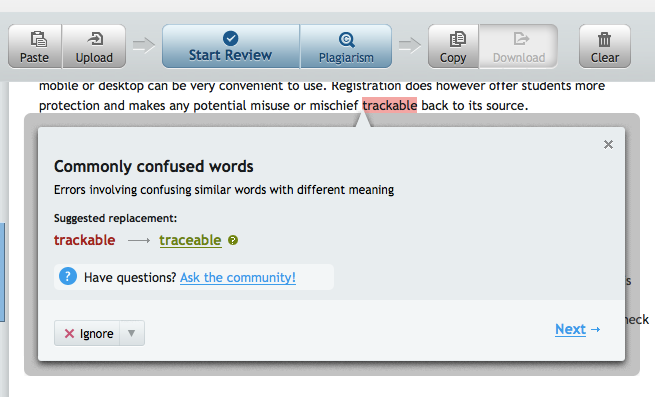
Grammarly highlights areas of potential error and then makes suggestions for you.You can then work through the errors deciding whether you want to correct them or leave them as they are.


One really nice feature is the ‘Ask the community’ feature. So if you are really unsure whether you or Grammarly is correct you can post a question to the community and see what they have to say.

 Your question goes onto the Grammarly answers blog and this makes quite interesting reading for anyone with an interest in Grammar and error correction. This would be a great place to get your higher level students reading through problems and trying to decide how to help.


Grammarly also gives you explanations why the grammar needs to be corrected, so using this regularly can help you to better understand the rules of English grammar.


If you’re feeling that your vocabulary is a bit limited and repetitive, you can also use Grammarly to get suggestions for synonyms to replace some of the word you over use.


Grammarly is also a very effective plagiarism checker, so if you are writing a long assignment or dissertation and you are worried that you may not have cited all of your sources, Grammarly can check through for you and find the link back to any online source you may have missed.

Just out of curiosity I ran one of my previous blog articles through Grammarly. It came up with 72 potential errors. When checking through them, they weren’t all errors, but there were certainly a few, so knowing how hard it is to proof read your own text, I think I could be using Grammarly again.

There is of course a catch though as Grammarly isn't free. Whether you are prepared to pay for it though will depend on how much writing you do  in English and how important it is to you that it's absolutely accurate. I think for EAP students or teachers who have to do a lot or written work and marking of written work, Grammarly could be a very sound investment and save a lot of time.

Related links:
Best

Nik Peachey

Friday, 5 April 2013

Exploiting Infographics for ELT

For a while now I have been increasingly interested in using infographics in the design of the learning materials and courses I create for students and teachers.

For those of you who haven’t encountered the term ‘infographic’ before, an infographic is a visual representation of, what is often, quite dense statistical information. 

This is the kind of information which can be very difficult to read as prose / text, but which, when transformed to a visual, can become accessible very quickly.

If this explanation isn’t clear then you can click on the infographic about infographics and get an example which should make some of the benefits of infographics a bit clearer.


There are a few reason I believe these infographics are so useful for language teaching (especially online) materials.
  • They convey a lot of information using a minimal amount of language. This can make them useable at quite low language levels where intelligent materials for adult learners can be hard to find.
  • They are quit vocabulary rich
  • They are visual and the visual and mathematical / statistical aspects can help to convey meaning.
  • They are much easier to read then dense text on a computer screen.
  • They lend themselves to a wide range of tasks
  • You can find infographics quickly and easily on almost any topic.
  • You can develop students visual literacy
  • You can help students to become more critical of information sources (for example the infographic I linked to above has some interesting statistics, but are they true?)
  • They are great preparation for EAP students who will have to deal with dense information in their studies.
Finding infographics is quite simple. There are quite a few sites which specialise in publishing them.
  • Visual.ly has huge collection and they are easy to search and locate.
  • Daily Infographic also has a huge collection and if you sign up on the site they will email you a new one every day.
  • Cool Infographic is also quite good.
  • Failing all of these sites, you could just go to Google and type in any topic followed by the word infographic and then when you get the results go to ‘images’. This never fails to pull in something of interest on the topic.

 Once you have found the infographic you want to use, you’ll need to design a task. Here are a few generic tasks that could work with many of the infographics and don’t require you to do any preparation.
  • Find 5 - 10 interesting facts in the infographic.
  • Try to check some of the information in the infographic to find out if it is true or false. See if you can find a secondary source to support the information.
  • Write up some of the information in the infographic as a summary text / report.
  • Give a spoken presentation to the class using the infographic as support.
  • Produce a quiz about the infographic to check the understanding of other students in the class.
  • What information surprised you most in the infographic?
  • If the infographic is a survey you could get students to compare the statistics in the infographic with an analysis of their class using the same questions. Here is an example of an infographic which I used with an adult class to do a similar thing - Have you ever?  As you can see it is very similar to ‘Find someone who’ and lends itself to practice of present perfect and past tenses.
Use of infographics isn’t confined to receptive understanding though, there are also a number of free tools which can help you to produce your own.


My favourite of these is https://www.draw.io/ which has a great collection of icons and images as well as the usual shapes and symbols. You can search through these easily and just drag and drop them onto you page, then either save it as an image or store it on Google Drive.


If https://www.draw.io/ doesn’t work for you or you want something simpler, I have stored links to a collection of various infographic tools here on Meaki - Infographic tools 

Again there are lots of tasks you can use to get students creating their own infographics. Here are a few.
  • Get them to create an infographic based on a text they have read. This could include relationship map of the characters, timeline of events, actions that took place in particular places etc.
  • Get students to convert a text which has statistical data into an infographic. This could be based on a classroom survey or could be something from a business magazine etc.
  • Get students to create mind maps of words based around topic areas and add visuals to them.
  • They could create an infographic of information based around a verb tense. This could include timelines and illustrated example sentences as well as breakdown of form and pronunciation features.
These are just a few of the ways I think we could and should be exploiting infographics with students. I hope you find them useful. Over the past year + I have been using Pinterest to collect together the infographics that I feel have potential for exploitation in teacher training or language training materials. You can access these below.
I hope you find these useful.

Buy Now
Related links
Best
Nik Peachey

Friday, 18 July 2008

Preparing EAP Students

I've just spotted this wonderful new resource for helping to prepare foreign students for study in the UK. It's called Prepare for Success and has lots of interactive features including video and some online tasks.

The site covers a really wide range of issues that overseas students are likely to encounter when studying abroad including study skills, tips for critical thinking as well as things like dealing with different cultures and working with other students.

Here's a video from 'language challenge' section.

You do not appear to have a suitable video player installed. Please download Apple Quicktime and install it to view the video.

This is a fantastic resource and has some really nicely designed materials which should be useful to any EFL / ESL students, even if they don't intend to study abroad.

The materials were developed by the University of Southampton

Definitely worth recommending to and using with your students.

Best

Niki Peachey