Showing posts with label flipped class. Show all posts

Thursday, 1 February 2018

30hands - From Flipped Learning to Digital Narrative

I’ve just been looking over the 30hands Pro app for the iPad.

30hands is a simple to use app and community for the development and sharing of instructional presentations and videos.


The app itself enables you to either upload an existing slide deck, video or images from your computer , Google Drive or Dropbox , or create your own slideshow within the app using the drawing tools within the application.
Once your slides have been created or added you can then record a narrative over each slide and also annotate the slides using the drawing features.
Once your slide sequence and recording is complete you have a number of options for sharing it. You can export it as a video, save it to either DropBox or Google Drive or add it to the 30hands community site.
The community site has a really wide collection of example presentations and you can either view these as individual slides with their recordings or watch them as video.
If you are a community member you can also download the videos and the project files and this will allow you to edit, adapt and build your own version of the presentation for your students.

Using 30hands with students

  • This is a great tool to create flipped learning video content. There’s loads of variety in what you can do, from uploading and enhancing your existing presentations with audio and annotation to creating unique slides and integrating images and video.
  • You can also use the app to create digital narrative using images from around the internet (Pixabay and Unsplash are two great places to find royalty free images) or you can use your mobile device to capture images and video and then add your own narrative voiceovers.
  • This is also a great tool for capturing student project work and for enabling student to do project reports. They can just grab images or upload their work and then add a narrative voiceover explaining their learning outcomes.
30hands works as a native app on iOS or can run in the Chrome browser on other devices so it can also be used in the BYOD classroom.

This is a great tool to enable teachers to create materials or to put in the hands of students to help develop their digital literacies and make learning tangible with genuine outputs that they can collect into a digital portfolio.
I hope you enjoy using this app with your students.

My Books:

 Best

Nik Peachey

Wednesday, 15 November 2017

Making your Classroom Paperless and Media Rich with Unio

Unio is a great tool if you want to ditch your course book and make your lessons paperless and media rich.

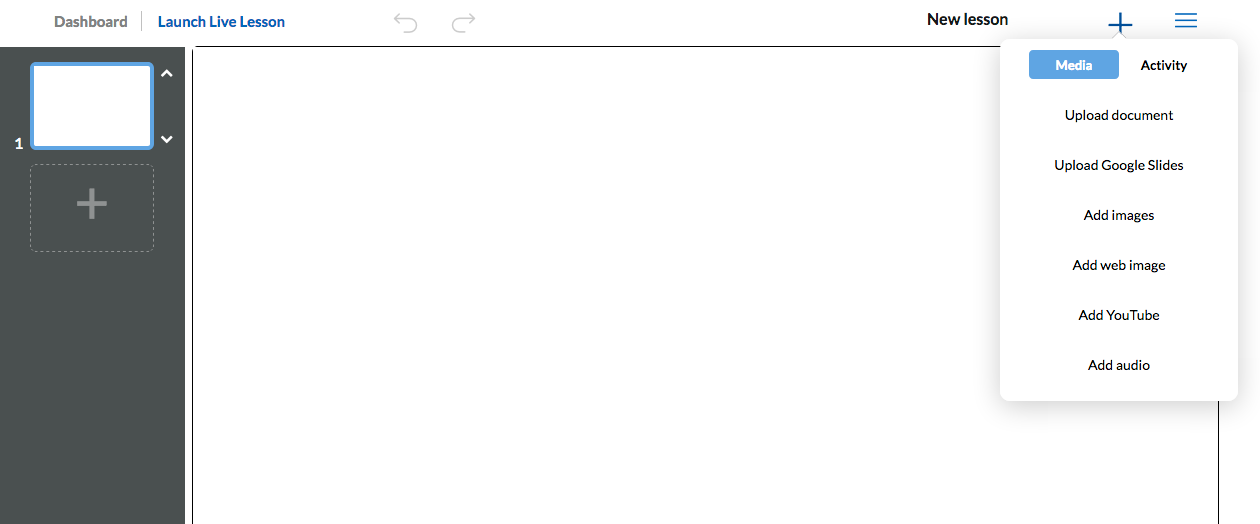
It’s a very easy tool to use. You can set up courses just by clicking on the cross in the top right of screen.
Once you have created your course topic, adding and editing lessons is simple.
Once the editor is open you can upload ready made presentations in multiple formats and add interactivity to them or create the lesson by adding individual elements and interactive learning objects.

Once the lesson is created Unio is really simple to use. You just launch the live session and any student can then log in to the lesson with just their name and the class code.

Unio works in the web browser so will run on any device regardless of the operating system, so it’s ideal for the BYOD classroom.

Once students have the lesson open on their device they can use the tools to annotate it, answer polls, watch videos or if they have questions they can send them in to the teacher.

As the teacher you can control which slide they are seeing or you can ‘unsync’ the presentation and allow them to browse. When the presentation is ‘unsynced’ students can watch any video or media clips independently on their own devices rather than collectively on your main presentation screen. This is great if you want students to watch or listen at their own pace.
When you finish a live lesson you can leave it open for students to browse and work through independently, so there is potential to use this for a flipped learning approach too, or you can use it for 100% online classes instead of screen sharing (and save a lot of bandwidth).

Unio is a freemium product, but the free version is very usable and the if you want to upgrade and use this at a school level then it’s still very reasonably priced.

Unio is still in its early days and the company is very keen to work with schools and educators to develop the product. You can find out more about that here: https://uniobyharness.com/about

Unio has huge potential for the digital classroom and is a great way to keep devices, fingers and minds occupied and working in a constructive way.

I hope you enjoy using Unio and your students find it rewarding. You can find 100 + more tools and resources like this in my ebook Digital Tools for Teachers - Second Edition or if you want to train other teachers to use these kinds of tools check out the Trainers’ Edition.


My Books:
 Best

Nik Peachey

Friday, 30 August 2013

Creating interactive video on the iPad

TouchCast is an iPad app that I downloaded recently and have been exploring a bit over the last couple of weeks. It's not often an app come along which really shakes up and existing genre like video, but I think TouchCast does and in a way that can be very beneficial for learners.

TouchCast is a bit like having a TV studio in your iPad. You can both film and produce really polished interactive content which can link to media and learning resources all over the web.

Here's a quick look at the kind of content you can produce.

I think this kind of tool can be really beneficial for creating flipped learning or video orientated learning as the speaker can guide learners to various learning resources on the web. They can also embed visual support for language learners such as text and images and even write over the video as though it were a whiteboard.

In my next posting I'll have a closer look at some of the features of TouchCast and how it can help you produce professional looking content, but for now watch the video and if you like it go and download a copy while it's still free (The free account enables you to produce up to 1 hour of content).

I hope you enjoy this great educational tool.

Related links:
Best

Nik Peachey

Friday, 8 June 2012

Engage Students with Flipped Video Tasks

The concept of the flipped classroom seems to be gaining ever increasing momentum within the field of education generally. Much of this revolves around the use of video to deliver input / lectures to students who can then come to class and do the more engaging and practical part of their work with some teacher support.

One of the major criticisms of this method though is that a dull unengaging content doesn't suddenly become engaging because it's on a video on the web, so how do we get students to engage with the content and make sure they watch it in a challenging and interactive way.

Vialogues is a useful tool for attempting to do this (though dull content will always be dull) because it enables you to create interaction around the video that actually gets students to think about and engage with the content.

Here's an example Vialogue I created around one of my own (rather old) short videos.


As you can see it has the YouTube video (you can also upload video from your computer if you prefer) but I have been able to create a few questions and simple polls for students to interact with at specific points in the video.
As I said, this doesn't make the content any more lively, but it does make the viewing process a little more interactive and collaborative.

So if you think the flipped classroom approach is for you ( and your students) then Vialogues could be a good tool to try.

I hope you enjoy it.


Related links:

Best

Nik Peachey