Showing posts with label discusion. Show all posts

Monday, 13 November 2017

Develop Critical Thinking Skills with Kialo

Kialo is a wonderful tool for developing critical thinking skills and to develop students’ abilities to look at and explore multiple perspectives of complex issues in a clear and logical way.
The site enables teachers to set up complex topics and structure ‘pros and cons’ type debates around them.

This is simple to do. Just set up your topic, add an image and some explainer text that you want students to read first and then invite students to add either pros or cons.
You can keep your debate topics private and only allow your own students to add to them by creating teams and then sharing different discussions with the team, or once you have 15 comments you can then publish them and open them up to the public. This process of collecting a reasonable number of comments before going public helps to ensure the quality and integrity of the discussion content already on the site.
Once you have created a team you can also share any of the existing debates with your students too.

This is a great place to get your students thinking in a structured and logical way about complex topics and is a great way to prepare them for a classroom debate or discussion.
The discussions have been categorised into topics to make them easier to browse. A lot of the existing content has a very strong US bias, but there are still quite a few internationally relevant topics if you don’t want to create your own.

I hope you enjoy using Kialo and your students find it rewarding. 
 
You can find over 100 digital lesson plans, videos and teacher resources in my Teachers' Classroom App
 
Teachers' Classroom App


 Best

Nik Peachey

Saturday, 9 September 2017

Writing & Discussion Activities to Promote Awareness of Fake News

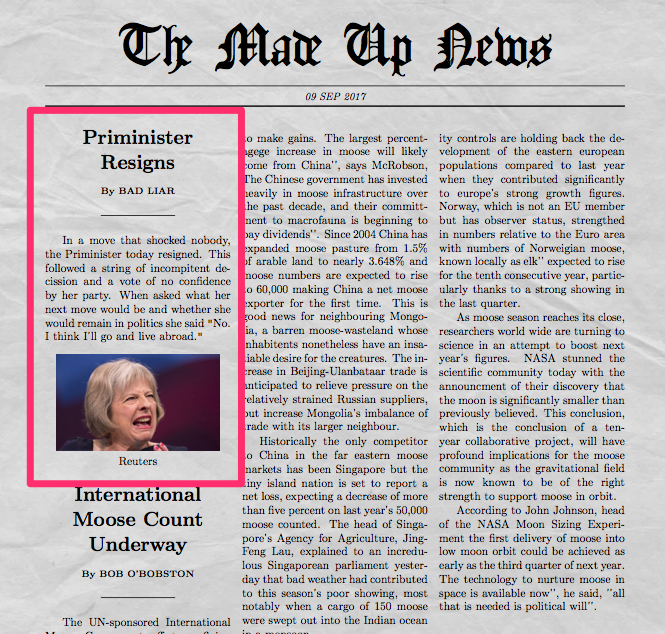
Newspaper Generator is a useful tool that enables you to create what looks like a newspaper front page.
To do this you upload an image, select a title and a headline and then write in the details of the story. Then just click on 'Make it' and the site will produce a PDF that you can download.
You can use this in class for a number of activities.
  • This is a nice way to get students writing news type texts and then publishing them.
  • You can also use it to get them thinking about fake news by creating a selection of news articles, some based on real news stories and others that you invent. You can then ask them to research the articles and find out which ones are real and which are invented.
  • You could also use the headlines and articles to generate discussion over which are real and which are fake or work on how to spot fake news.
  • You could get students to create their own fake news test by creating two real news stories and one fake one. They can then see if they can trick their classmates into believing the fake one is true. They could use this Factitious game as their inspiration. 

Newspaper Generator can be used in an enjoyable way to raise awareness of issues regarding the credibility of news and to promote more critical thinking.

See also: 6 Useful Resources for Exploiting the News in the English Language Classroom

You can find more tools and activities like these in my ebook 20 Tech Enhanced Activities for the Language Classroom.

The book is available on iOS or as PDF for other devices.

Sign up for my twice monthly free newsletter and get a free copy of Digital Tools for Teachers at: https://tinyletter.com/technogogy/ 

My Books:
 Best

Nik Peachey

Tuesday, 29 August 2017

From Image to Story - Motivating Reading Tasks on Powerful Issues

Time 100 is an amaxing feature from Time Magazine. It's a collection of 100 images that have had the power to change the world. The images are displayed on a time line and you can scroll through and click on each image.


As you click through the images you can find out about the story and photographer behind it.Many of the images also have video clips about the content which range from short 2 - 3 minute clips to longer documentaries.

Many of these are very powerful images and stories, so this isn't suitable for younger learners, but if your students are more mature, these images and stories could provide really interesting reading and discussion materials about a range of issues.

You could let students choose an image each to do further research on and then get them to prepare a short presentation about it.

They could discuss which of the images they find most powerful or which they think is still most relevant today.

This is a great collection of images that have had huge influence on modern politics and society so well worth spending a few lessons with these.

You can find links to many more tools like this and activities for the digital classroom in my ebooks at: http://peacheypublications.com/. All my ebooks are available for iOS and as PDF.


Sign up for my twice monthly free newsletter and get a free copy of Digital Tools for Teachers at: https://tinyletter.com/technogogy/ 

My eBooks:

Best
Nik Peachey