Showing posts with label IWB. Show all posts

Friday, 7 October 2011

Can you replace your IWB with a $10 dollar app?

Idea Flight Enterprise is a new idea that makes a first attempt at using iPads to replace both the expensive IWB and the data projectors in your classroom.

In many ways it's a great idea that centres around using a $10 (£7)  iPad (Pilot) app to share materials and interact with a classroom full of students.

Students will also need iPads and to download a free (passenger) app so that they can view the lesson materials and make notes on them.

The 'pilot' or teacher can open their PDF course materials and take students through them page by page in step allowing students to make notes on the materials as they go. They can also 'unlock' the materials which will allow students to move backwards or forwards through the materials independently at their own pace.

The Idea Flight Enterprise app ensures that the teacher and students are all seeing the same materials and so this negates the necessity for both IWB and data projector (Though it is possible to plug the iPad into a data projector too if you require that)

The app runs through either the wireless connection (with up to 14 students) or through connecting the iPads by Bluetooth (with up to 3 students).

This looks like it could be a really good product for schools with small classes / classrooms, especially those teaching business English or very modern schools who want to experiment with class sets of iPads.

What I like about Idea Flight
  • Assuming that students already have iPads, buying a $10 app could save you the price of both a data projector and an IWB.
  • It would be ideal for teaching small classes or one to one classes off-site, especially when there is no internet connection as you can connect through bluetooth.
  • It synchronizes with your DropBox public folder so it's easy to upload your materials if you have a free account.
  • It allows schools to create their own course materials using PPT, Keynote or Word and publish them as eBooks in PDF format for their students.
  • Students can make notes on the materials and then store their own copy.
  • Running materials through iPads rather than desktop or laptops enables your students to still be pretty mobile within the classroom, so you can still easily move them around and regroup them for discussion and human interaction within the classroom.
  • The app has 'Linkedin' integration so new students can see each others profiles etc and find out about one another more easily, so this also makes it a great networking tool.

What I wasn't so sure about
  • In the PDF materials I used in the app, all the hyperlinks were dead, so it would be nice if linking out to other materials were possible through the app.
  • The app only runs on iPad which makes it a bit restrictive. It would be nice to see integration with the web, so that students with laptops or other tablets could also be included in the same class.
  • I didn't try the app with video embedded into PDF so it would be nice to know if that worked, but I'm assuming it's unlikely.
  • Classes of 15 students on wireless or 3 on bluetooth, make the use of this app pretty much restricted to private or very privileged classrooms, so it would be nice to see greater numbers of students made possible.
  • It would be really good if a broader range of formats could be imported into the app. At present, any animations or effects that can be created with presentation software are lost when the materials are exported to PDF.

Despite some of the weaknesses of this Idea Flight Enterprise, I still think it's a massive step in the right direction towards enabling greater use of these kinds of devices in the classroom and, at $10, making that step an economical choice and one that is a better fit for an interactive communicative classroom than something like and IWB and data projector.

If you are thinking of introducing iPads within your school environment, and especially if you are developing your courses and course materials in-house, then I definitely think Idea Flight Enterprise is worth investigating.

Here's their short promotional video showing how it works.


This is an independent review that was written at the request of one of my sponsors - Idea Flight Enterprise - What I have written was in no way influenced or edited by them.

I hope you find it useful.

Related Links:

Best 
Nik Peachey


Monday, 16 May 2011

Questioning the Role of Technology in Education

Over the last six months I have been involved in a project with Delta Publishing on their development blog as a guest author to produce a series of postings which question the role of technology and how it is applied in ELT and education in general. This has been a bit of a new departure for me because I usually focus on very practical articles and tend to avoid getting into the sometimes lengthy debates that surround technology with ELT.

I'm now coming to the end of this series for a while and so I thought I would collect together these postings and some thoughts on what I've learned from the interaction with the various teachers who have responded to these posts.

Here you can see a short video I created to introduce the series.


Here you can find a brief summary and link to each article.

ELT and the Crisis in Education
In this first article I tried to put ELT into the greater context of general education and what is being described by some as the 'Crisis in education'. I often think that ELT is viewed and views itself in isolation from what is happening elsewhere in education. I used a social questionnaire to encourage readers to reflect on their beliefs and compare them with those of other readers.

ELT and the Crisis in Education – Part 2
In this article I tried to highlight and share some of the reading and viewing that had influenced my own thinking about the problems that education faces today and the kinds of changes we need to make.

ELT and the Crisis in Education: Technology in the Classroom
In this article I tried to examine what I believe are some of the mistakes that have been made in our attempts to overlay technology onto our existing classroom design.

ELT and the Crisis in Education: Digital Literacy
In this article I tried to examine the role of digital literacy within ELT and highlight the importance of improving our understanding of what digital literacy is and how and why we should integrate it into our course design.

ELT and the Crisis in Education: Digital Reading Skill
In this article I tried to examine the way receptive skills and the demands on 'readers' of web based content differed from the traditional reading skills we develop with our students.

It’s time to change the way we test our students
In this article I tried to examine the role of testing and its negative impact on the potential of ELT to move forward and become more innovative.

Breaking down the walls of the classroom
In this article I tried to examine the way that technology could be applied to course work to extend learning beyond the walls of the classroom and support a more blended and autonomous approach to the use of technology in ELT.

Some Pros and Cons of iPads for ELT
In this article I tried to examine the potential of iPads and tablet style devices within the classroom context and look at the way course books and published materials could be enhanced to make digital course books much more interactive and communicative.

The worst thing about educational technology is educational technology
In this article I tried to look at some of the worst aspects of our fixation with 'hardware' and the problems caused by misguided spending on complex gadgets without funding the support to make these work.

Is the 140 character ‘micro interaction’ enough?
In this article I tried to look at our tendency to be obsessed with 'the latest thing' and how this often limits view of what is potentially available to us. I tried to particularly focus on a contrast between microblogging and 3D game playing in virtual worlds.

Augmented Reality and Web 3.0
In one of my last posts I speculated about what could be the next step in terms of the way the Internet is developing and I had a brief look at how this could potentially impact on ELT.

Survey: Mobile Learning in ELT 2011
My final post will be a write up of some research I have been doing into mobile learning. This will be a follow up to some research that I published a year ago into the use of mobile learning devices in ELT.

I'd like to thank all the people who have left comments and questions on the articles and especially I would like to thanks everyone at Delta Publishing for sponsoring this series and leaving me absolutely free to say whatever I want.

I hope you enjoy reading them.

Best

Nik Peachey

Tuesday, 4 May 2010

Future of Educational Technology 2: The Web Cam

In the first of these articles on the future of educational technology I had a quick look at the Digital Divide and how continually falling prices and improving standards could help to bridge the divide. In this second article I'd like to look at the developing role of the web cam.

Video Conferencing
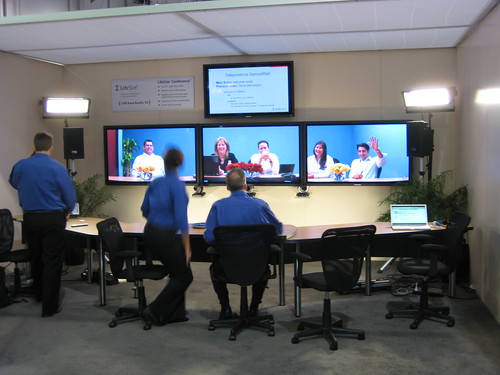
So how about the role of the humble web cam? Web cams have been around for a while now, though they don’t tend to get used so much, though there is a lot of talk about telepresence. Telepresence is supposed to be video conferencing but with such good quality it seems like the person is in the same room with you. Here’s what it looks like.

http://www.flickr.com/photos/av-1/3521310150/

Looks pretty expensive doesn’t it? I can’t say I’m impressed by this. Having used very similar equipment (probably equally expensive) and tried to have discussions between two groups of people in different rooms, I have to say that even if the quality was great it would be far from ideal.

Personally I feel that we can work just as well on our laptops with the built in web cam and a free tools like Tokbox.com. The quality that these services can offer is likely to improve over the coming years as they become more popular and attract more investment.

http://www.flickr.com/photos/mortenjust/2209302906/

Iris and Facial Recognition
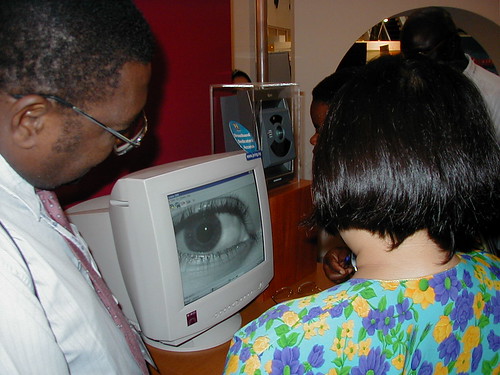
But how about this idea? Have you been through immigration at an airport recently. If you have you may have had your iris scanned as a means of identification. Suppose the technology that this system uses develops to the point where you can authenticate your identity on your computer through your web cam. So no more logging in and trying to remember user names and passwords to the sites you register on. Just sit in front of your computer and it knows who you are and unlocks all your sites and web based services for you. Possible? Useful?


http://www.flickr.com/photos/fn-goa/169836309/

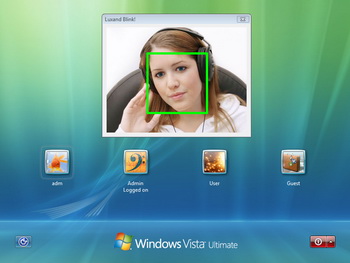
Face recognition is also becoming more common place and you can now download free software for Windows ( http://www.luxand.com/blink/)that will recognise your face and log you into your computer, so no more forgotten passwords!


Motion Recognition
Motion recognition through web cams is also making its way into games and there are already quite a few free games that you can try out using your web cam as the controller.
There are a lot more web cam controlled games available at:
http://webcamgames.sky.com/ if you feel like investigating more.

Well and what about your interactive whiteboard? What’s the connection between IWBs and web cams? Well your web cam could make the need for a specialised board and controller obsolete pretty soon if the guys at Camspace http://camspace.com/ have anything to do with it. They have been developing this system which turns any coloured object into a computer controller.


If we start applying this kind of technology to IWB software it could mean that any students in your class could hold up a pen or any coloured object and take control of the computer and write on the board from where ever they are sitting. Giving this control to students could make that interactive whiteboard a lot more interactive and better still save a lot of money.

So our web cam is not only the doorway to video conferencing and communication, it could soon also become a way of logging onto our computers and conforming our identity, a way of interacting with our computer and a way of giving students control of the board and making their interaction with the computer as a class a lot more interactive.

So that’s just a quick look at the part the humble web cam could play in the future of learning technology. I hope you enjoyed it and that it gives you some food for thought about the way technology can change the way we learn.

Related links:
Best

Nik Peachey

Wednesday, 25 November 2009

The Web 2.0 School of the Present

I was recently invited to participate in a really interesting workshop organised by Richard Johnson, Director of ELI Seville. The focus of the workshop was 'The Language School of the Future' and it produced a number of scenarios for the possible development of private language schools, which varied from the 'business as normal' model to a total shift away from scheduled classroom lessons. I'll post more about those scenarios later in the month, but it did occur to me that before we look to the future we could pull language schools and language departments into the present.
The 'Web 2.0' age has brought us more than a bunch of social networking apps and free web tools, it has also brought about a fundamental shift in the way many web based companies do business. I started to wonder if that change could be mirrored in the physical market place by moving towards a new approach to the language school and the way technology is used in it and how it fits into the face to face business model.

What follows are some suggestions for what I feel could bring about a shift in the way language schools market themselves and integrate technology, not just into the classroom, but to the whole school environment.

How to make your school a Web 2.0 school of the present

1. Ubiquitous open wireless access
This is probably the most basic and fundamental change that you could introduce in your school and the one thing that could have the biggest long term impact.

Make wireless Internet access freely available from anywhere in the school, without restriction, to anyone who wants to walk through your door, regardless of whether they pay for a course and regardless of how they use the access (within the bounds of the law and socially acceptable norms etc). Don’t password protect the access make it easily available to anyone and everyone.
  • In doing this you have removed one of the most significant obstacles to the exploitation of web enabled technology within your school. Teachers will have FAR fewer problems using Internet in classroom and will feel more confident about trying things out new things and experimenting in a more spontaneous manner.
  • They will have far fewer problems accessing online professional development materials and web based teaching materials and they will be in a much better position to start developing themselves and joining the numerous online communities of teachers globally that support and develop each other.
  • You will soon find more students and teachers coming to your school with laptops and other mobile devices to use the free Internet access and staying longer. You will have succeeded in making your school 'sticky'.
2. Make your whole school into a learning zone
Once you have open access wireless connectivity in your school, the whole school can become a learning zone, not just the classroom. Help students to exploit this.
  • Make room for people to come and hang out in your school, a kind of relax cafe area where they can bring in a laptop or other portable device. Make it friendly and sociable (don’t provide computers for them or computer booths where they sit facing the wall, make it open where people can wander around and see what others are doing etc.
  • Have member(s) of your teaching staff on hand in this area to provide free assistance to anyone who wants to come in and learn. It could be anything from a bit of help with their pronunciation or advice in pointing them towards the best online materials available to help them learn autonomously, or giving advice to parents on how to help their kids learn online.
  • Make sure you have plenty of visible information about good learning tools and freely available resources and where online learners and teachers can find and try them all over your school.
All of this might seem like you are giving away your 'product' but if your teachers are good and people are learning informally in your school, they may soon find that they want to learn more and take more formalised classes.
3. Get teachers developing online materials and sharing in the benefits
Lots of schools try to get teachers creating and sharing materials but there is seldom any reward or acknowledgement of the amount of time and care this takes. Get your teachers together and start training them to use blogs and wikis and get them producing and publishing their teaching materials online. Try to get them to pool these materials into one easily searchable wiki type site or a group of interconnected blog sites.
  • Make sure that they know that they will retain copyright and ownership of all the materials they produce and that they will continue to own these materials even if they leave your school. The materials will become part of their professional portfolio.
  • Make the materials your teachers produce freely available and open to the whole world to use, comment on and feedback on. This will help to make your teachers more aware of the quality of the materials they are publishing and get feedback to create and improve their materials. They will also find out how their materials are being used.
  • Plug in revenue generating tools such as GoogleAdsense etc, look for sponsorship and advertising and make it clear that all teachers who contribute will get their share of any revenue that is generated. Make it clear that the school will not take a percentage of any of the revenue generated, but will only benefit through the links, branding and reputation it develops through displaying the quality of its teachers / materials and teaching.
In the early days any revenue generated through advertising will be small, but as the scale of the resources grow, so will the revenue.

4. Getting technology into your classrooms
A lot has been said about the pros and cons of interactive whiteboards (IWBs), but whether you like them or hate them, they are part of the natural evolution that is taking place within the classroom and most schools will soon have them. One criticism of IWBs is the price, but they don't have to cost a lot as there are low cost hardware systems available and free software which is every bit as good and in some cases better than the software that would come with a commercially purchased board.

So here is what you can do to get your school equipped with low cost IWBs. Find your techiest geekiest teacher (the one who talks about things like Ubuntu and Linux) give him or her a budget and some free time and ask that he or she provides you with a home made interactive whiteboard installed and ready to demo. Tell him or her that if it works they can have an extra time to produce more.
  • If your teacher is successful you will then be able to put interactive white boards in every classroom for less that 100 euros a room (you will still need to have a computer and data projector for each classroom too, but this will have saved you significant amount of money)
  • The best place to start researching about how to create a low cost IWB is Johnny Lee's website. Also get your nominated teacher to have a look at the Wiimote Project site.
  • Here are 3 sites which produce free or low cost web based apps that can be used to replace the commercially produced IWB software.
    Dabbleboard

    Scriblink
    Twiddla
Having IWBs in class isn't a magic bullet, but it does at least get live Internet into your classes and increase the chances that your teachers will start using a more diverse range of multimedia materials than they would normally find in a course book.
5. Get your teachers connected from anywhere
One of the best ways to get your teachers trained and web savvy is to make sure they have web access wherever they are. Subsidize your teachers' purchase of an i-Pod touch (even better an i-Phone if possible) and train them how to use it to download materials from i-Tunes, get free apps, view YouTube video, download free audio and video podcasts etc etc etc etc etc.
  • Train them to use it in class (well before they actually need to) to show images, video get information etc. Within the next year the i-Pod touch is likely to include a camera for video too and this will enable teachers to start producing video projects with their classes too.
6. Provide multimedia capable computers
It's amazing how many schools I visit that provide computers that don't have speakers. microphone or webcams! These are fundamental necessities for exploiting the true range of web based resources available and for transforming computers from passive information display devices into dynamic creative communication tools.
  • Make sure every computer that you provide for the classroom, media lab or staffroom has a built in webcam and microphone as well as speakers or that these things are available.
  • WebCams can enable teachers to bring the world into their classroom and take their classroom to the world in a very powerful way and for free.
  • Make sure these computers are fitted with video, image and audio editing software. All of this can be accessed or downloaded free from the Internet. This can make a whole range of video and audio based activities possible.
Of course the success of all of these measures is really dependent on training and motivating your staff, but by providing easily accessible wireless connectivity you are greatly increasing opportunities for staff to start developing themselves and each other and promoting in atmosphere in which learning can take place at anytime and anywhere in your school, not just in the classroom.

I hope you find these ideas interesting, useful and at least a little bit provocative. By all means leave comments criticisms or suggestions.

Related links:
Best

Nik Peachey

Wednesday, 17 June 2009

Listen to Coffee With Pete Sharma

I'd like to extend my thanks to Pete Sharma who appeared on 'Coffee With ..' on Sunday June 14th. I really enjoyed our discussion which covered, experiences in Second Life, Pete's views on blended learning, Interactive Whiteboards and a range of other technologies


You can listen to an audio recording of the chat here. Many thanks to Carol Rainbow for supplying the recording for the session again.

'Coffee With Pete Sharma' was hosted on Edunation II and sponsored by The Consultants-E.

Hope you enjoy listening.

Related links:
Best

Nik Peachey

Monday, 10 November 2008

Shared Work Space With VOIP

I've just been trying out Twiddla and I have to say that I am very impressed. Twiddla is more than a shared online whiteboard / work space, it also enables groups of people to surf websites together, comment and notate them with all the standard IWB tools.

Best of all though it also supports synchronous audio through VOIP and even allows you to embed videos and other kinds of code into the page. Oh, it's also free!


Twiddla is a great tool for anyone involved in online learning and would also be pretty handy to use with a data projector to save paying out for an expensive interactive whiteboard. It all runs in the browser and there's no need for any downloads or even any registration if you don't want to.

If you want to give it a try then just click the icon below and it will load automatically in your browser. Feel free to play with it , doodle, erase etc.

Twiddle this page!

If you click at the bottom of the interface where it says 'Widgets and Code', you can even try embedding a video into the screen.
What do you think?

At present it looks like it is free, which is great. I haven't tried this with more than one other person, so I'm not sure how efficient or what kind of lag there would be if you got 7 or 8 all working together with audio too. If anyone tries it please do let me know and post a comment.

Hope you enjoy this and find a good use for it.

Related links:
Best

Nik Peachey

Thursday, 24 July 2008

Online Interactive Whiteboard with VOIP

Well the online whiteboard market seems to be heating up with another impressive offering. I wrote about Dabbleboard last week, and now only a week later I've just spotted Scriblink which takes things a step further and includes VOIP, text chat and provides users with link to their online board.

I just created this quick labeling activity using an image from Flickr creative commons


The site has now generated me a link to this page to share my whiteboard online.

Click here to check it out live (Takes a little while to load)

All this seems like interesting stuff for anyone involved in online synchronous tutoring.

Looks like it's free too!
There's a more detailed description of the features here.

Hope you find this useful.

Best

Nik Peachey

Friday, 18 July 2008

Free IWB Software

Dabbleboard is a fantastic whiteboard application which runs in your browser. It has all the usual whiteboard features plus some nice extras.

It's really easy to use and draw shapes even using a mouse. You can embed images from anywhere on the web into multiple pages. When you've finished creating your whiteboard pages you can download them, share them publicly online or email them to students (great way to send your students notes or their lesson).

You can use the software without registering, but if you want to save and share whiteboard flipcharts them you'll need to create a simple account (which doesn't seem to require any personal information beyond your email address).
The fact that it runs in your browser (seems to work fine in Firefox 3 and IE7) means that it will run on MAC or PC without any software to download.

At present the public library of flipcharts isn't too impressive and just looks like people testing out the software, but if this takes off there could be a pretty impressive collection of teaching resources there.

If you can use this with a data projector and Camspace controller software, then you've got yourself a pretty cheap interactive whitebaord to use in class.

Great stuff.

Best
Nik Peachey

Related postings:

Tuesday, 3 June 2008

Who needs an interactive whiteboard?

By the looks of this, the need for interactive white boards will soon be a thing of the past. You should soon be able to control your computer using a webcam, a piece of free software, and well just about anything!!


Looks pretty amazing. If it can work on these complex games, I don't see why it shouldn't work on ordinary software and a data projector. Could save on buying those expensive IWBs. I've signed up for beta testing, so I'll let you know how it goes.

The company that produces this is called CamSpace and the product itself is called CamTrax.

Best

Nik Peachey

Friday, 16 May 2008

YouTube for IWBs with PicLens

While I was checking links yesterday for the posting to my learning technology blog, I was delighted to see that PicLens have added YouTube support for their browser plugin.

Click here or on the image to watch a movie showing how it works (2.2 Mb)

This is one of my favourite plugins and I think it's a fantastic teaching tool, especially for those with IWBs (interactive whiteboards) or data projectors in class. (See my Learning technology blog posting for teachging ideas for ELT).

This addition of YouTube support means that we can now get full screen Youtube videos direct to the classroom without any of the distracting text or advertising that lives on the web page, and in the fantastic PicLens 3D immersive interface.

If you want to use PicLens then you can download it for free from here:
Love it

Best

Nik