Showing posts with label activities. Show all posts

Friday, 28 February 2020

Actively Learn - A Huge Resource of Ready-Made Interactive Learning for English Language Learners

Actively Learn isn’t just a great source of learning content for grades 6 through to 12, though if you are teaching adult learners much of the grade 12 content would still be appropriate. It’s also an LMS that enables you to create and track the use of learning materials across your classes, and a teacher development tool that enables you to train teachers in aspects of materials development and instructional design.
Ready-Made Content for ELA

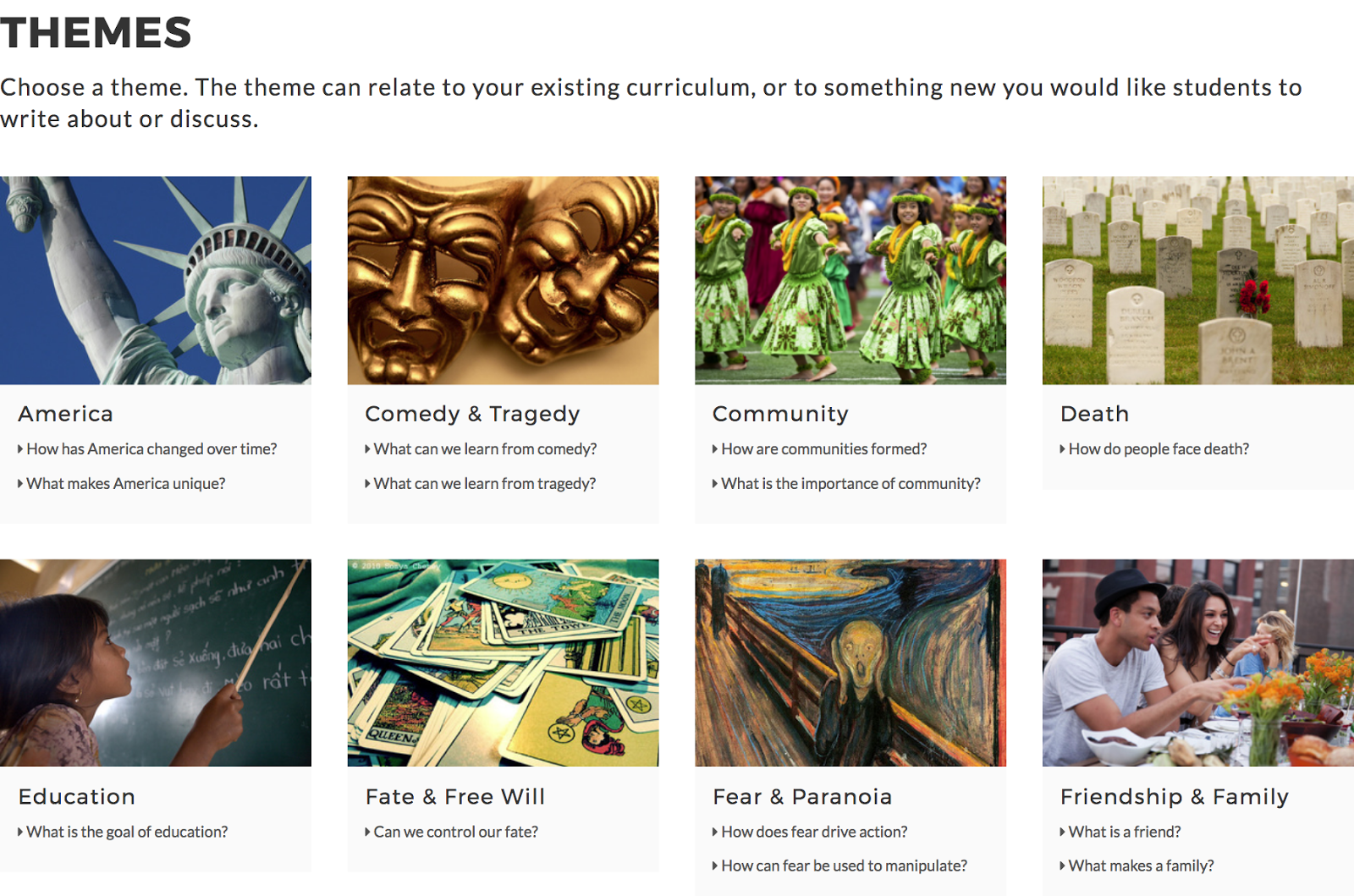
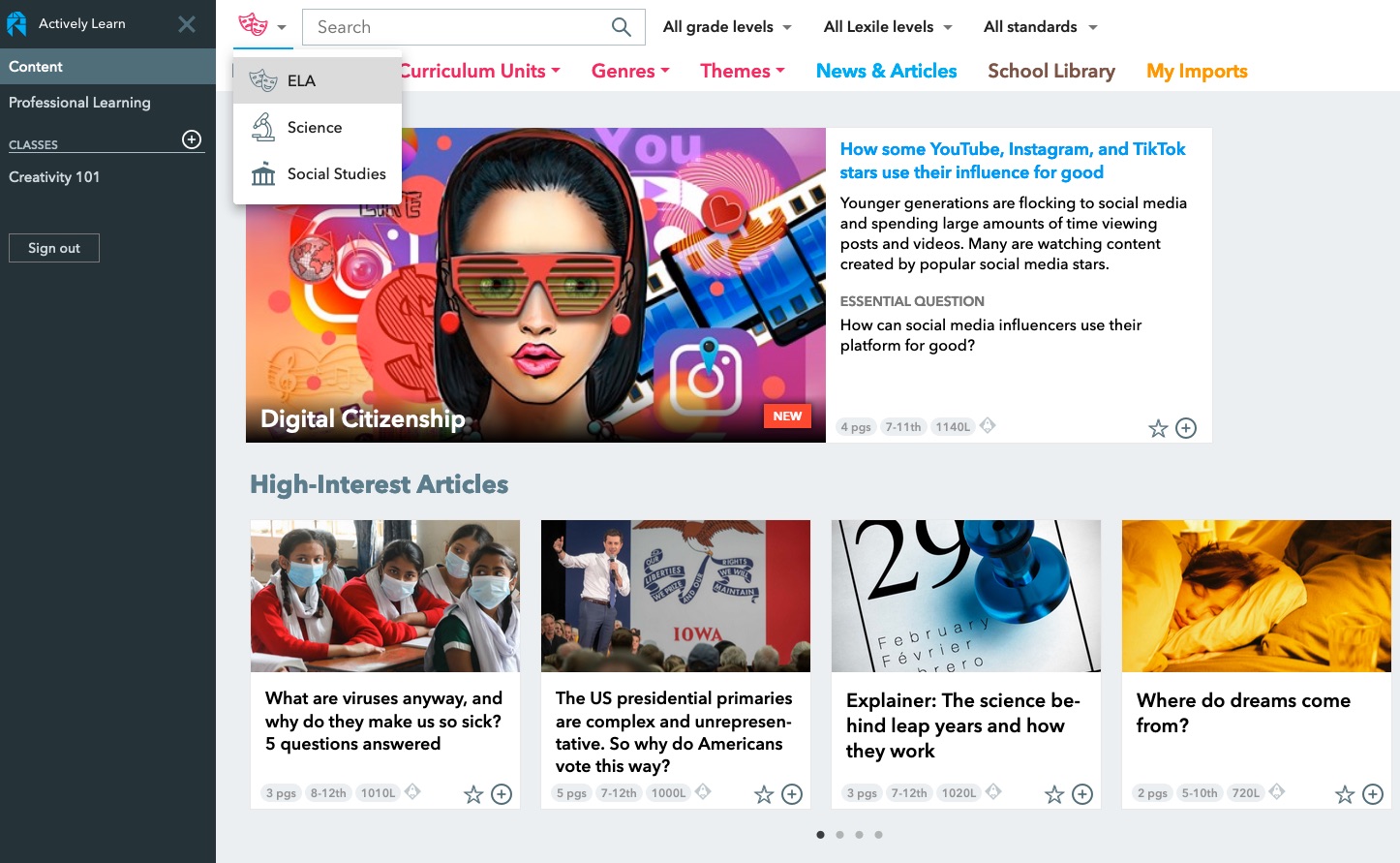
Actively Learn already has a really substantial amount of readymade interactive learning content when you log in. The content is easy to browse or search, initially by subject (ELA, Science or Social Studies) and then by a range of different parameters, from grade to topic to theme or genre.


Once you have found some interesting looking content for your students you can click through to see the activities that have been designed for it and the guidance notes for the teacher. There is also a brief introduction to the text. The questions that you can see as you scroll through the text are interactive and when the text is assigned to the student their responses will be tracked into the reporting part of the site.

If you want to change some of the questions or add cultural notes or word definitions through the text you can also do this, just click on the ‘Customize’ button at the top of the screen.

To add notes, questions or definitions to words, just highlight them and you will see a menu appear.
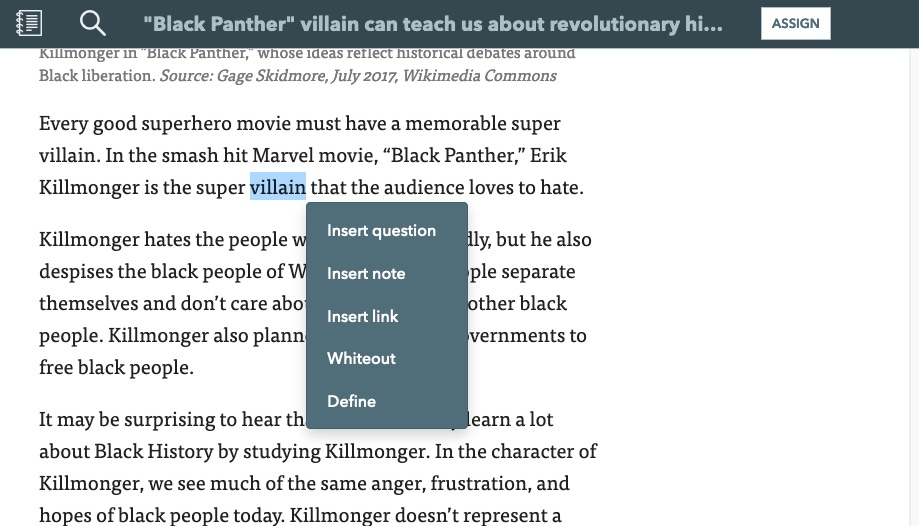


Once you have your text and all of the tasks ready, just click on ‘Assign’ and the text will be sent to the class that you choose.
Creating Classes and Measuring Learning

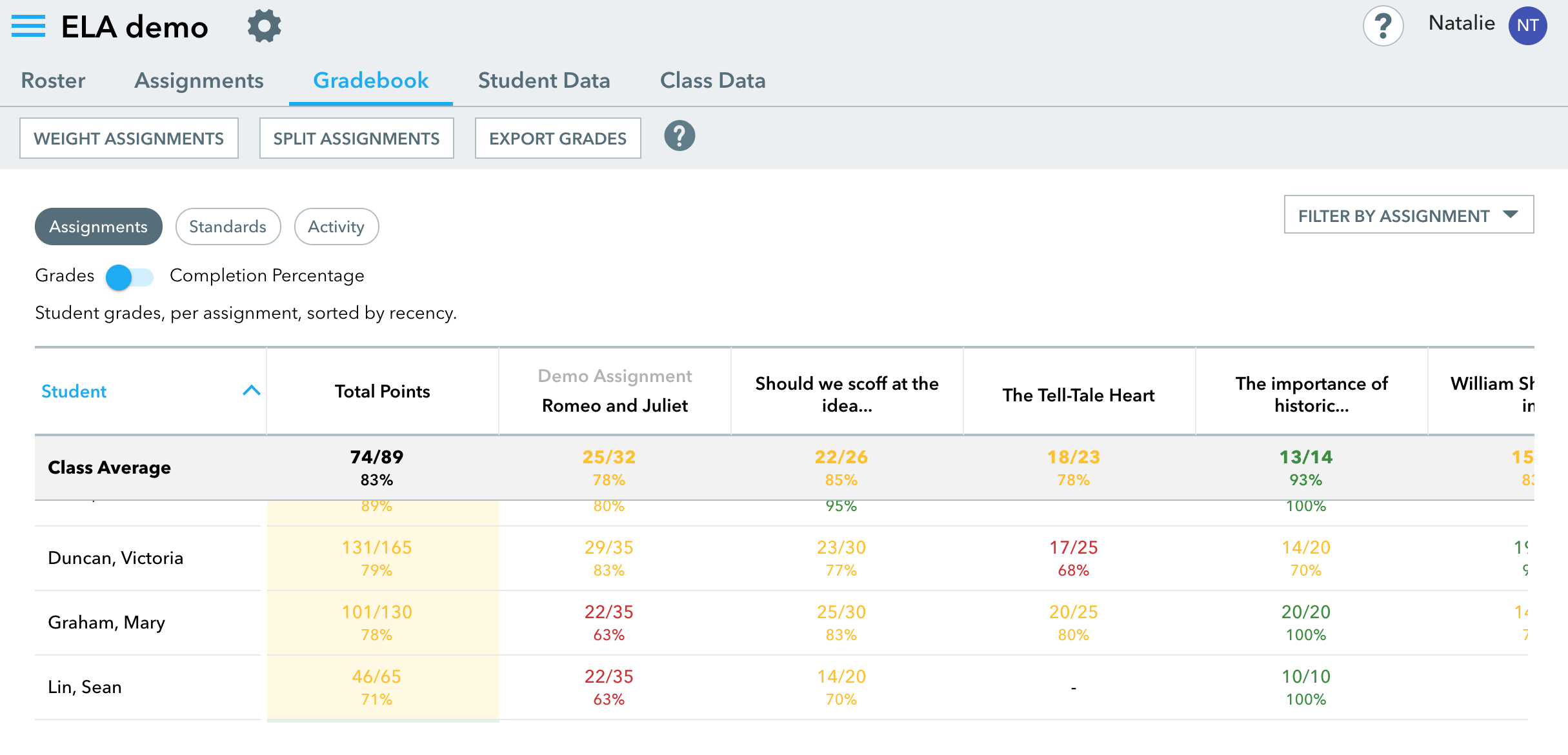
Setting up classes is simple. Just click on ‘Add new class’ on the main menu and you’ll be able to give the class a name and select the grade of the students. You get a simple code to give to students that enables them to enroll in your class. Once the students start to interact with the content you’ll be able to track their work through the Gradebook and Student data. You can also get an overall view of the class data.


Creating and Customizing Content

Actively Learn isn’t just for the development of reading skills though, you can also access or create your own content based around online video. Just select ‘Video’ on the ‘Genre’ tab and you’ll see the selection of ready-made video content. When you select a video you’ll see that it has question marks beneath the video play bar. When the students get to this point in the video it will pause and show them a question. By clicking on ‘Customize’ and then clicking on the play bar you can either edit or add new questions to the video.

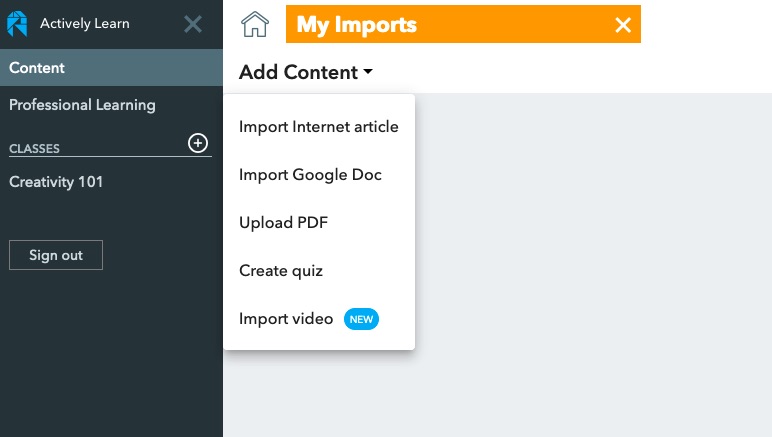
If you decide you want to add your own content, then click on ‘Import’ and select the type of content you want to add. You can then start to add interactions and questions to it before assigning it to a class.

Actively Learn for Teacher Development

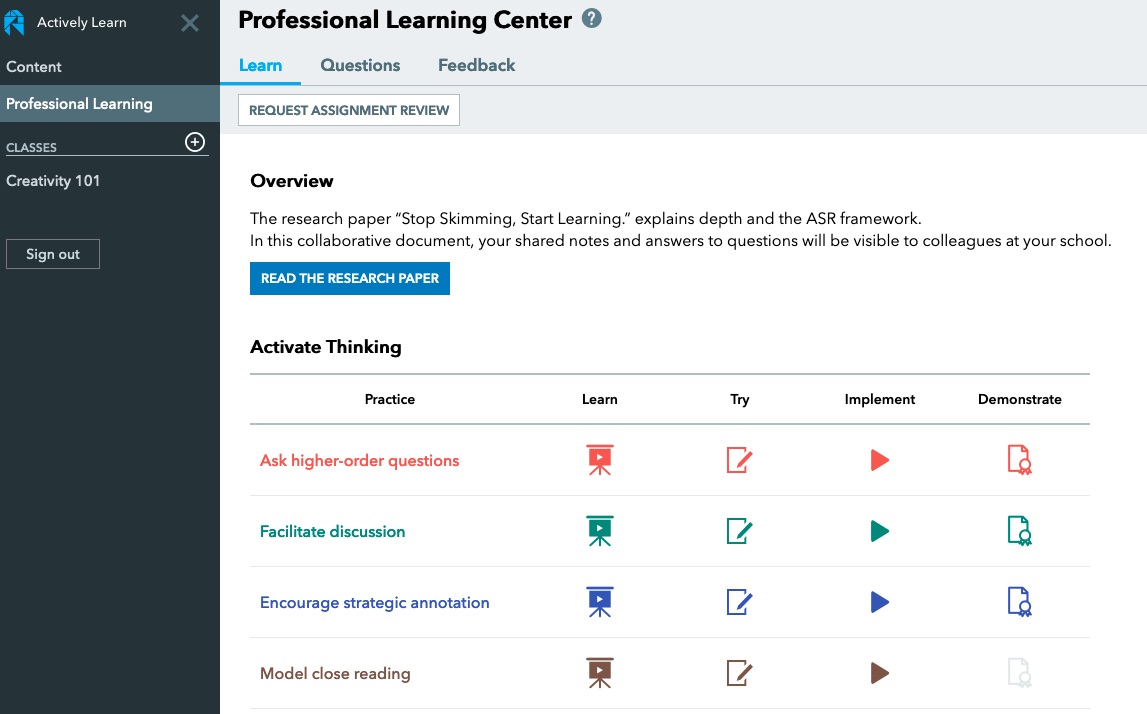
As I said at the beginning of this article, Actively Learn is also a tool for teacher development and has some really well-structured learning activities for teachers that will help them use the platform more successfully. To find these materials click on ‘Professional Learning’ in the menu.

The Professional Learning section starts with a research paper that teachers can read and comment on. The interactions around this paper will be shared with other teachers who are registered at the same school. The platform then has a collection of sequenced activities that teachers can work through to develop different aspects of their professional knowledge whilst helping them to use the platform more effectively with some ‘hands-on tasks’.

Actively Learn Plans

Actively Learn is a pretty impressive platform with a great and constantly growing bank of materials. As a teacher you can sign up for an individual account and use Actively Learn for free, but for the real power of the platform, along with API integrations into Google Classrooms, SIS or another LMS, you’ll need a premium plan. These plans are negotiated with schools according to what elements of the platform and integration they need and the number of students involved. At the school level, it’s clear to see how Actively Learn could have really clear and measurable benefits that could have genuine impact on students’ learning.

You can find links to many more resources like this and activities for the digital classroom in my ebooks at: https://payhip.com/peacheypublications
To sign up for my free newsletter and get a free copy of Digital Tools for Teachers go to: http://eepurl.com/dtgL79

Check Out My Books:

Tuesday, 7 November 2017

Becoming a Technology Teacher Trainer

I’m really proud to announce the release of the second edition of my Digital Tools for Teachers ebook and also the Trainers’ Edition which should enable any teacher with a basic knowledge of technology to run teacher training and development courses and sessions for pre-service and in-service teachers.


The two ebooks are available for both iOS/ Apple devices as well as in a PDF version that can be used on any reader, smart phone or computer.


The Second Edition of Tools for Teachers contains a new chapter on games and gamification with X links to games and game type resources that you can use with your students to develop their language skills. In addition to this the other chapters have had some 30 additional tools added.

The teacher trainers’ edition includes all the extra materials mentioned above as well as 3 additional chapters to enable any teacher to use the book for teacher training and development purposes.

These chapters include tips and advice for trainers, more than 20 teacher training activities that exploit the resources in the book and a chapter on digital tools for trainers that can enable them to deliver paperless digital training sessions.

The Second Edition of Digital Tools for Teachers is available from
The Trainers’ Edition of Digital Tools for Teachers is available from
I hope you find these books useful and they help you to develop your own teaching and the teaching of others as well as the learning potential of your students.

My Books:

 Best

Nik Peachey

Friday, 22 September 2017

Free Reading Passages and Progress Tracking Tools

This site was designed to help grade K5 - K12 native speaker students develop their reading and comprehension skills, but can also be really useful for second language development.
Students can choose from a range of graded texts and get a wide range of interactive activities and reading support. Teachers can also register on the site and assign specific texts to their students.

The reading support tools combine text-dependent comprehension questions and discussion type questions to focus students’ attention as well as text-to-speech and dictionary / glossary type vocabulary support. Students and teachers can also download the text as a pdf file.

CommonLit is great for getting students to work more autonomously on their reading skills.

You can find more tools and activities like these in my ebook 20 Tech Enhanced Activities for the Language Classroom.


The book is available on iOS or as PDF for other devices.

Sign up for my twice monthly free newsletter and get a free copy of Digital Tools for Teachers at: https://tinyletter.com/technogogy/ 

Related links:
 Best

Nik Peachey

Thursday, 21 September 2017

Find and Create a Variety of Interactive Activities and Assignments for Your Students

This is a really useful collection of activities assignments and tools for teachers and students.
There are lots of ready made interactive activities designed for learners. You can search through these and find something appropriate for our students. Some of these look a bit homemade, but the functionality and design is sound.
There are also tools you can use to create customised content for your students’ specific needs.
For most of the assignments you need to register on the site and create a class. You can then create assignments for students to do and track their progress.
Some of the activities are translation dependent, so registering (which is free) will also help set the language used.

Some of the activities I liked most are The Manga Maker, Vocalyzer, Essay Rank and Error Spotter. For the ones that involve voice you'll need to make sure students are working on Google Chrome.
In some cases the assignments need a little more instruction on how they are created and how they work, but it certainly looks like this is a resource that will continue to develop if it gets support.

Apps 4 EFL is free, but you can help to support it through Patron and it may well be worth doing so if you find it really useful for your students.

You can find more tools and activities like these in my ebook 20 Tech Enhanced Activities for the Language Classroom.

The book is available on iOS or as PDF for other devices.

Sign up for my twice monthly free newsletter and get a free copy of Digital Tools for Teachers at: https://tinyletter.com/technogogy/ 

Related links:
 Best

Nik Peachey

Monday, 4 September 2017

10 Free Apps to Enhance your Students' Learning

In this post I'd like to take a quick look back at ten of the most popular posts I wrote from last month. These posts cover a host of free apps, games and resources sites that you can use to create engaging digital learning for your students.

Create Vocabulary Activities from Authentic Text in Minutes
WordBooster is a real time saver for anyone creating courses using authentic materials.
 The site generates word lists and vocabulary quizzes from authentic texts and includes definitions of the words and a range of activities to help students understand and remember the word.
Get Teens Writing with Gamified Writing Activities
Story Wars is a great gamified way to make writing creative and competitive.
Students read short chapters of the beginnings of stories and then have to submit the next chapter for the story.
Give Young Learners Structured Writing Practice with WritingSparks
WritingSparks is a great site for giving structure and adding an element of fun to writing activities, especially if you have a data projector so that students can see the prompts on the screen.
Create Texting Fiction to Keep Your Teens Engaged
Texting fiction is a new emergent genre of fiction writing that is becoming very popular among teens and I have to say when I started reading a few of these creations I can see why.
Basically the narrative is structured as a phone based text conversation and can include images and videos as well as text and audio message
6 Useful Resources for Exploiting the News in the English Language Classroom
In this article I'm sharing a collection of resources that you can use with your students to help them understand news stories in English.
Create Animated Speaking Activities with Toontastic
Toontastic provides the kind of activity that could be used to get younger students speaking and it gives them the opportunity to play out different roles and to listen and reflect on their own speaking before they save and share.
Build Your 3D Virtual Reality Classroom Today
This is a great tool for running online group classes or social events for online students.

There is also now the capability to build course materials and launch commercial courses through: . You can also take free courses that can help you use the platform.
Using Computer Games to Raise Awareness of Global Issues
In this post I'd like to introduce a few games that you can use with students as a springboard for discussion on what can be some difficult issues for teachers to address in the classroom.
Get Students Creating Video Summaries with Lumen5
This is a great tool for quickly creating video summaries. You can use it to write a short summary or just put in the URL of an online article or blog posting and then pick the parts of the text you want to include in the video.
I hope you enjoy these resources and make good use of them with your students over the coming year.

You can find more tools and activities like these in my ebook 20 Tech Enhanced Activities for the Language Classroom.

The book is available on iOS or as PDF for other devices.

Sign up for my twice monthly free newsletter and get a free copy of Digital Tools for Teachers at: https://tinyletter.com/technogogy/ 

My Books:
 Best

Nik Peachey

Wednesday, 19 April 2017

20 Tech Enhanced Activities for the Language Classroom

I'm proud to say that I've just published another ebook through PeacheyPublications.com

20 Tech Enhanced Activities for the Language Classroom was designed to be the first in a series of collections of the simple activities and ideas I have used over many years when delivering teaching and teacher training sessions that incorporate the use of digital technologies.

The ideas use simple free tools that have stood the test of time and remained consistently reliable. The teaching ideas and activities themselves are ones that I have adapted from my pre-technology teaching days, so they are all built on sound classroom teaching practice.


The activities are ideal for the modern connected classroom in which students come to class with a variety of devices, but they can also be used in a blended context and students can be assigned some parts of the tasks to do outside of the classroom.

I have also included a collection of 8 video tutorials to help less tech confident teachers deal with the technology side of using the materials.


I hope 20 Tech Enhanced Activities for the Language Classroom will act as a bridge for teachers who are newer or less confident at using digital tools and materials and help them provide engaging and motivating language learning experiences for their students.

I hope you find this ebook useful.

Related links

Best
Nik Peachey

Tuesday, 8 September 2015

Video creation activities

Here are two of the 40+ activities from my book - Digital Video - A manual for language teachers.

The activities in the book are split into two main sections:
  • Activities which encourage comprehension through viewing
  • Activities which encourage students to produce language by creating video

These activities are from the second section.

If you enjoy these and find them useful, please buy the book (£1.99 / $2.99 US) and find lots more like this.

The book is available for the iPad at: https://itunes.apple.com/us/book/digital-video/id1025275485
Or you can download a version that can be read on any device from Scribd: https://www.scribd.com/doc/276137280/Digital-Video-A-manual-for-language-teachers 

Related links:

Best
Nik Peachey

Thursday, 1 November 2012

Tall Stories as Digital Narrative

One of my favourite ways of helping students with the difference in use between 'present perfect' and 'past simple'  forms is a simple but effective activity called lies and truth.


All you need to do for this activity is to think of three - five statements about yourself using the 'present perfect' tense

Here are a few examples:
  • I've been in prison.
  • I've been married 3 times.
  • I've never eaten meet.
Then get your students to ask you for background information about them to find out which are true. The students should use past simple to get the details. Once the students find out about me they pair up and interview each other using the same format.

This is a simple but engaging activity that I find students really enjoy it and get a lot of speaking practice from it.

Recently, I've spotted a website called BluffBust that works on a similar format. The website contains video clips of people telling stories about themselves and then visitors to the site have to decide if the stories are truth or lies. Here's an example based around a song


Which story is true? 'I'm 6 feet tall' 'I drive a honda cr-v' 'I've never been to Hawaii'

I think this is a great way to get students developing their listening and speaking skills and something that they can engage with outside of the classroom. The language being used is very authentic, so it might be a struggle for lower levels, but for higher levels it should be appropriately challenging and give them some real exposure to authentic English.

All of the content on the site is user generated, so you can also get students registered and creating their own interactive video stories and activities. There are a number of game interaction types which you can see here: BluffBust Game Types

This looks like a great way to get students developing the listening and spoken fluency outside of the classroom in an enjoyable and competitive (there is a leaderboard) way.


Which story is true? 'Legs not attached' 'Expensive hand cream' 'No Macarena'

The site might not be appropriate for younger or lower level learners though, but you could pre-sellect some specific videos that you could use in class as a way to get your students practicing the same activity in class.

I hope you and your students enjoy BluffBust and it helps them to develop their speaking and listening skills.

Related links:

Best

Nik Peachey

Thursday, 21 April 2011

36 Tools to Digitise Coursebook Activities

Over the last few years, I have often heard teachers commenting that they would like to use more technology with their students, but they have to cover the materials in the coursebook. So, I started thinking about ways we could use technology to quickly and simply convert coursebook activities to something more interactive on the web.

I've created this document which shows 36 different ways we can use web based tools to enhance the things we do in the classroom and make students homework options more interesting and communicative. This document was used to support my presentation at IATEFL Brighton and you can see the presentation slides at: 36Tools for Digitising Your Coursebook

36 Tools for Digitising your ELT Course Book

I hope you find these useful and I hope to find the time soon to develop this document and add more detail and more examples. Until then please feel free to add comments and suggestions below and share ideas that you have for digitising coursebook materials.

Related links:
Best

Nik Peachey

Thursday, 3 June 2010

ESL Activities to Explore Issues Around Human Migration

Over the last few months I have been gradually working away at editing lesson plans and writing activities that exploit materials from the OPENCities project and I would like to share links to those materials here.
OPENCities is a project that collects together information and case studies on best practice regarding the successful social and cultural integration of migrant workers and their families into their host cities. As many of you probably already know, the issue of migration will be one that is and will continue to have huge impact on our societies over the next few decades and dealing with this effectively is going to be of key importance.

Language is of course a huge issue for anyone moving to another country and so it seems appropriate that the materials, information and images from the project be exploited for their language learning potential, as well as the potential they have to inform, enlighten and open up discussion about what can be a very sensitive issue.

Here are links to some of the materials.

Who is it?
This activity contains audio, script and images of real people who migrated to Dublin. The students find out about some of the real people and have to imagine the lives of some of the others to build up a profile.

Image by Veronica Vierin www.ctmp.ie
Activity: Who is it?

The challenges of being a migrant
This is a speaking and listening activity that involves students in thinking about the kinds of problems and challenges they might face as a migrant going to Belfast. They then listen to the true stories of 5 migrants talking about the challenges they have faced and this is made more real for students because these are genuine stories and the materials include images of the real people.

Activity: The challenges of being a migrant

Artists as immigrants
People’s ideas of what an immigrant to their country is and the kinds of work they do can often be very stereotyped, so in this activity I’ve tried to confront those stereotypes by using images of different kinds of artists all of whom are migrants to Dusseldorf. The students have to imagine they are one of the people and try to see the experience of migrating from their perspective.

Images by Liza Nguyen www.liza-nguyen.com
Activity: Artists as immigrants

These are just a few of the activities I’ve created and there should be some more on the way soon. There are also 4 complete lesson plans with pages of linked activities.

Most of the materials contain images as well as Mp3 audio recordings for listening exercises. You can find a complete list in the Education section of the OPENCities website.

I hope you find these activities useful, and if you d then look out for more coming soon.

Related links:
Best

Nik Peachey

Sunday, 30 May 2010

Image Based Speaking Activity for IWB

This is a quick image based speaking activity that any teacher with an IWB or just a data projector in their classroom can do.

It's based around a photographic portfolio site by photographer Scott Stulberg. Scott's site opens directly to a slide show of some of his fantastic images.
The slides change at the rate of about 1 every 4 seconds and the sequence seems to be pretty much the same each time you go to the site. Here you can see Scott's images

So what's the activity?
  • It's very simple tell your students to watch the image slide show. After about 10 - 15 images, close the site and put your students in pairs and try to get them to brainstorm as many of the images as they can remember. This should get them talking and describing the images to each other.
  • Once they have had some time to talk and remind each other, get some feedback from the class and try to get them to describe as many of the images as they can remember to you. Help them with any vocabulary they may be struggling with.
  • Next, ask them if they can remember the order of the images. Which one was first etc? Put them in pairs once again to discuss again and try to remember the order.
  • Next, play the slide show again and get the students to check the order. When the slide show is finished. Get the students to once again tell you the order of the slides.
  • In the next lesson, ask the students again to try to recall and describe in pairs as many of the images as they can remember from the previous lesson. You could use some vocabulary words, especially the new words that came out of the lesson as prompts.
If you want to follow this up by getting some more static images to get students to describe in more detail, then be sure to check the index, as there are lots more images there.

I've always found images to be a very powerful tool for helping students to remember vocabulary and descriptive words. I hope you find this activity useful.

Find more: image based activities for EFL / ESL students

Related links:
Best

Nik Peachey

Sunday, 9 May 2010

Create Quick Interactive Activities

I've just been looking at this really useful tool for creating interactive close text activities (300 words limit).

The tool is produced by Nottingham University and can work with quite a range of languages, not only English.

The first step is to grab a text you want to use with your students. I just grabbed the first couple of paragraphs of a BBC News Report. Paste the text into the field and select which type of words you want to remove. Then select the type of activity you want it to be. At present there are 3 choices:
  • Drag and drop
  • Fill in the blank
  • Multiple choice
Just click the one you want and then click on 'Submit' and wait for your text to appear.

The drag and drop activity works pretty well. The students see the words beneath the gapped text and drag them onto the gaps. If the words are correct, they turn blue and become part of the text, but if the are wrong, they turn red and return to their place.

With the fill in the blanks activity the students see the gapped text and click on the gaps to type in the missing words. Again, correct word go blue and wrong words go red. The students can right click on the gap to get a first letter hint, or the solution.


The multiple choice exercise is slightly more complicated, it generates a gapped text and then you have to right click on the gap to get the alternative choices to appear to the right of the screen. It's quite impressive that it generates its own credible alternative words for each gap, but when I tried to create an exercise that gapped multiple word types, it couldn't create the activity, so if you use this option just select one word type.


This is a really useful tool for quickly creating activities for students. The down side is these activities can't be saved, so you either have to use the activities in class with an interactive whiteboard or data projector, or get students to work autonomously to create and complete their own activities. My advice would be to do a few in class to show the students how they work, then get them to create their own on their own computers.

This is a great way to revise a text or to discover examples of particular structures in context. I like tat you can select to remove all numerals as this can be great for getting students to predict answers before reading for specific information.

I hope you enjoy using this tool and find it useful.

Related links:
Best

Nik Peachey

Tuesday, 27 April 2010

Create Quick Video Task Sheets

Vidinotes is an interesting site that I spotted a few weeks back. It's a great way to produce instant (almost) video worksheets to go with YouTube videos.

Basically, what it does is to convert an flv video file into a number of screen shots with a space next to each screen shot for the students to take notes.

I picked this silent video with sound track by Micheal Galasso as it has a very visually rich digital narrative and made a worksheet for it.


To do this I first had to download the video as an flv file. I did this using the KeepVid site recommended by Vidinotes. Then you have to upload the flv clip to the Vidinotes site. This was pretty slow, but it will depend a lot on the length of your clip and you can do other things while you wait for it to upload.


Once the clip is uploaded start to play it and simply click the 'Capture' button when you see a frame you want in your worksheet.

As you capture images they will appear on the right of the video. And you can either give each image a title or leave it blank. You have to give the worksheet a name though.

Once you have captured all the images you want from the video (you can select up to 30) you simply click on 'Print' and you have your worksheet.
You can use these worksheets for a range of activities and with a range of different video types.
  • You could use them as prediction tasks before students watch the clip. Students could predict the story or what the characters will say.
  • Students could try to write in what the characters are thinking at each stage of the clip.
  • Students could use the worksheet to make notes of lectures or how to videos.
  • Students could use them to summarise steps in a process being described.
  • Students could describe the images from the video and build their own narrative or sets of instructions.
Here are some example worksheets from the site. You can check these out and think about how you might use them with your students.
This is a great way to create simple and versatile video worksheets that won't take you too long. I hope you find it useful and create some great tasks and activities for your students.

You can find 25 more video related activities for EFL and ESL students here.

Related links:
Best

Nik Peachey

Wednesday, 22 April 2009

Interactive Forms for Surveys or E-Learning

I've just been having a quick look a JotForm and it looks like a very useful tool. JotForm is a simple online tool for creating online forms of various kinds.

There are a number of pre-configured ones that you can create and customize, just using the wizard, or you can create a blank one and add what ever features you want from the Toolbox, just by dragging them onto the page.

Once you have your features on the page, you just click on them and edit the properties. It really is very simple to do. You can use JotForm for a whole range of things and it has some very powerful features. As well as adding images, password fields and captcha from the 'Power Tools' section, you can also add payment features, to enable you to charge for services.


The blank form creation is great for creating your own e-learning materials. You add images, text and by dragging in an html element from the Power Tools, you can even put in code so that you can embed videos from YouTube or other rich media.

Then all you need to do is add a few questions, or a text box for students to write in and when they click on submit, their answers will be sent to your email address or stored online.

Apart from creating e-learning activities, you could use the forms to get feedback on your teaching or to do a range of classroom research tasks. You could even get your students creating class surveys and compiling the results. You can also embed the forms into your own website or blog.

JotForm has a free option which allows for up to 3 forms a month and 100 responses, which should be enough for the average teacher.

Fantastic free tool. There are some tutorials on the site too if you want to dig more deeply into the potential of this tool. Here's movie one showing you how to get started.


Hope you find it useful.

Related links:
Best

Nik Peachey

Friday, 12 September 2008

Autonomous Learning for EFL ESL Students

Well this news posting is actually about one of my own sites called Daily English Activities and this is a new site that I have launched to help EFL and ESL students develop their English language skills through online tasks.


I've tried to mix the tasks between activities that are 'made for' EFL ESL and ones that exploit generic websites. I've also tried to make these things that students could do every day.
So far the site is off to a good start with 9 activities up in the first week, the most popular of which is Exercise Your Ears with Authentic Film Clips.


So far the majority of the visitors seem to be teachers (80%) rather than learners (16%) but at this stage I'm happy with that as I think the site will be a useful tool for teachers wanting to set homework or for teachers wanting quick activities to print up for their students to do in a media centre or computer lab ( I've included a print as PDF function to make this easier)
To see a list of all the activities of the site so far please check out the sitemap and if you know of any EFL ESL teachers or students please send point them in my direction.

Activities so far:
Many thanks and best wishes

Nik Peachey